
When dust, pollen, pet allergens, or smoke are your main concern, you might wonder how to test if an air purifier ionizer feature can be switched off. The honest answer depends on the specific model, and the control panel is your first stop.
This article covers the easiest ways to locate the ionizer switch, from checking for common icons to using the power key or consulting your manual. It also explains what to do when no obvious button exists.
Choose a purifier that matches your room size and the pollutants you want to address.
Air Purify Highlights
- Check the control panel for a lightning bolt or molecule icon to find the ionizer button.
- Press the power button twice during operation and watch if the ionizer icon disappears.
- Use the manufacturer’s app to toggle off the ionizer setting from your phone remotely.
- Scan the manual’s index for words like disable, toggle, or optional ionizer.
- Measure ozone with a monitor near the exhaust before and after switching the feature off.
Find the Ionizer Off Button on the Control Panel
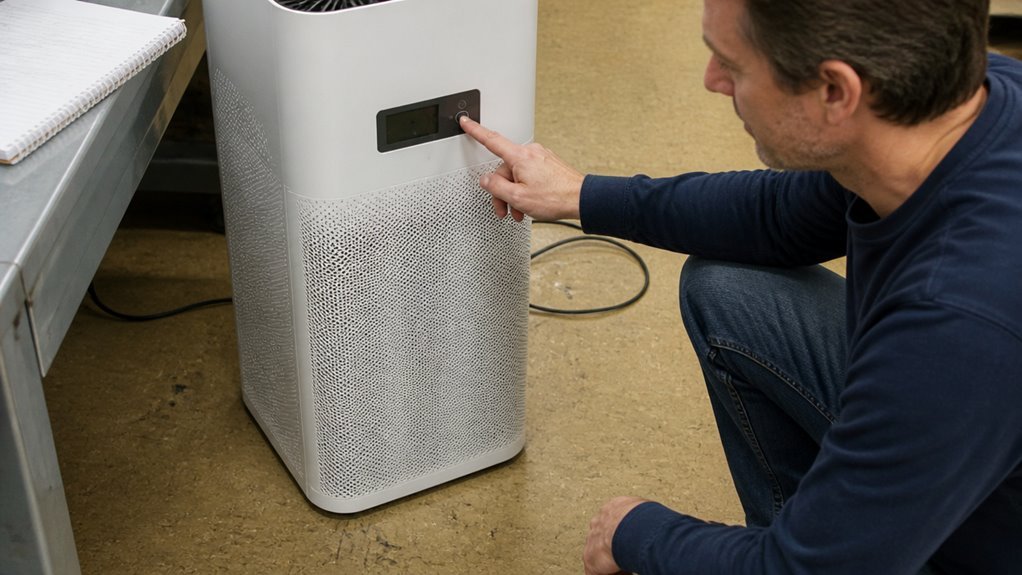
Many air purifiers put the ionizer off control directly on the unit’s control panel, so a quick scan often finds it. Look for a dedicated button marked with a zigzag lightning bolt or a tiny molecule icon, and press it once to turn the feature off.
The indicator light going dark confirms the ionizer is off, and toggling the button is harmless. If nothing stands out, check the manual, since some units label the control “Ion” or “Bipolar” instead of using an icon.
A button that does not adjust fan speed or timer is likely the ionizer control, and pressing it does not affect airflow or filter operation. Most control panels make this function easy to identify without opening settings menus.
Cycle the Power Button to Disable the Ionizer
Some air purifiers hide the ionizer control behind the power button, which can seem like a design quirk. On certain units, pressing power once starts the fan, and a second press turns off the ionizer because no dedicated toggle exists.
This power button cycling works only while the unit is already running, so test it during active operation. The procedure is simple and requires no app.
- Power on the unit. The fan starts and the ionizer icon may glow.
- Press power again. The ionizer icon disappears if the control responds.
- Wait several seconds. The ozone smell fades when the ionizer has stopped.
- Press power twice more to return to normal fan only mode.
Check the manual for models that lack this feature, as some units keep the ionizer always on. If the icon stays lit after cycling, your purifier does not offer a way to disable ionization from the power button.
Turn Off the Ionizer via the Manufacturer’s App
Using the manufacturer’s app is the most direct way to turn off the ionizer without touching the unit. For purifiers that support app control, the software typically includes a dedicated ionizer toggle that confirms the switch remotely.
Download the official app and pair the purifier over Wi-Fi, which usually takes under two minutes. Locate the ionizer toggle in the settings, flip it off, and watch the app’s status icon change to confirm the action.
Check that the remote control syncs with the physical unit’s display, proving the change took effect. If the app lacks that toggle, expect a hardware only switch, so verify app capability before relying on it.
Check Your Model’s Manual for Ionizer Toggle Specifics
The product manual is the fastest way to confirm whether your ionizer can be turned off, and it removes the need for guesswork or forum searching. Locate the ionizer section and check the index for terms like “optional ionizer,” “toggle,” or “disable,” since model variations are common.
Some units make ion production a secondary button press, while others keep it always on with no switch at all. If the manual says “always-on,” you will not be able to disable the feature, so read that section before deciding how to operate the unit.
Confirm Ionizer Shutdown With a Home Ozone Monitor
Use a portable ozone monitor to confirm that the ionizer actually shuts off. Hold the monitor six inches from the unit’s exhaust while the ionizer is supposedly off, and compare the readings to a baseline you take outdoors or in another room.
First, run the purifier for an hour with the ionizer off, logging readings every ten minutes. Then flip the ionizer on, repeat the same test, and compare the two sets of data.
If readings stay below 0.010 ppm during the off test, the toggle worked, and if they climb, the shutdown is not real. If the gap between the two tests exceeds 0.005 ppm, the control is faulty or the monitor lacks the precision needed for this check.
A handheld ozone monitor with adequate sensitivity costs around $100, which is a reasonable investment for verifying a safety feature. Check the baseline ozone level first so you know what is normal for your space, and keep the monitor six inches from the outlet during every reading.
Frequently Asked Questions
Does Disabling the Ionizer Affect HEPA Filtration Performance?
Disabling the ionizer does not affect HEPA filtration performance. Mechanical filtration stays exactly the same when the ionizer is turned off.
Your HEPA filter’s lifespan depends on how much particulate matter it captures, not on ionizer operation. Disabling the ionizer preserves efficiency and avoids any concerns about ozone, while HEPA filtration removes dust, pollen, and smoke particles on its own.
Can I Permanently Disable the Ionizer Feature?
Whether you can permanently disable the ionizer depends entirely on the specific model and its manufacturer design. Some purifiers have a dedicated setting that lets you turn the ionizer off, while others run it continuously with no user control.
If your model lacks a physical off switch and the ionizer is hardwired to run, disabling it requires opening the unit and modifying the internal wiring. This type of modification can void your warranty and create electrical or safety hazards, so consult the manufacturer’s instructions or a qualified technician before attempting any change.
For most people, the cleanest solution is to use a certified purifier that offers a clear, physical off switch for the ionizer. This allows you to avoid ozone emission concerns entirely while still getting effective particle filtration from the HEPA filter system.
Will the Ionizer Turn Back on After a Power Outage?
Whether your ionizer reactivates after a power outage depends on the unit’s power loss memory. Models with persistent memory retain the off state, so you will need to press the power button again yourself.
Other models default to ionizer on when electricity returns, which means you must manually turn it off to stop ozone generation. Check your user manual for the specific restart behavior. For any safety concerns regarding ozone, follow the manufacturer’s operating instructions on permitted usage and placement.
Does the Warranty Cover Ionizer Component Failures?
Warranty coverage for ionizer component failures depends on the specific terms in your owner’s manual. Many warranties exclude ionizer parts because they classify them as wear items affected by dust buildup or environmental conditions.
Review your documentation for the parts and labor coverage period for your model. If the fine print lists the ionizer as a consumable, you will likely pay for the replacement.
For a clear decision, contact the manufacturer directly with your proof of purchase and model number. They can confirm whether your specific failure qualifies, which is safer than guessing from generic advice.
How Can I Verify My Model Actually Has an Ionizer?
How Can I Verify My Model Actually Has an Ionizer?
Check the manufacturer’s specifications for your exact model to confirm ionizer presence. Then, look for a dedicated ionizer button on the control panel or a toggle in the app settings.
Verify it through ozone monitoring or by comparing particulate removal with the ionizer on and off. Ionizers produce ozone, so a distinct smell can also be a clue, but never rely on smell alone.
Ionizer safety concerns require you to confirm the toggle feature before operation. If the ionizer cannot be turned off independently, contact the manufacturer for official guidance on safe use.
Rounding Up
Start by checking the control panel or the companion app for an ionizer button, a long press on power, or a zigzag lightning icon, and turn it off there.
If the controls are unclear or you have health concerns about ozone, consult the manufacturer’s instructions first, and then use a consumer ozone meter to confirm levels drop. This advice changes if you run the unit in a small, poorly ventilated room, where even low ozone output matters more. For any doubt about safe operation, rely on the official guidance from the product manual or environmental agencies. Keep the ionizer off unless a specific need, like odor removal, justifies turning it back on.