Wondering how much airflow you actually need from an air purifier for a living room that collects dust, pet hair, and everyday odors? The honest answer depends on the size of your space.
This article breaks down the key numbers for room coverage and clean air delivery rate, along with how sensor based fan control and noise levels factor into daily comfort.
You will also learn what to expect from carbon filters for smell control and how sleep mode helps keep things quiet.
Focus on finding a unit that matches your room size and the specific pollutants you want to tackle first.
Air Purify Highlights
- A lab measured 398 CFM for PM2.5, reaching 91% of the advertised 410 CFM.
- For a 635 square foot living room, the real world gap between those numbers is negligible.
- Check the AirSight Plus sensor’s five second updates to see when auto fan shifts happen.
- Watch the indicator ring colors, which shift from blue to red based on PM2.5 thresholds.
- Auto mode caught cooking fumes within ten seconds and quickly ramped the fan to high speed.
Core 600S CADR: Real Tests vs. the 410 CFM Box Spec
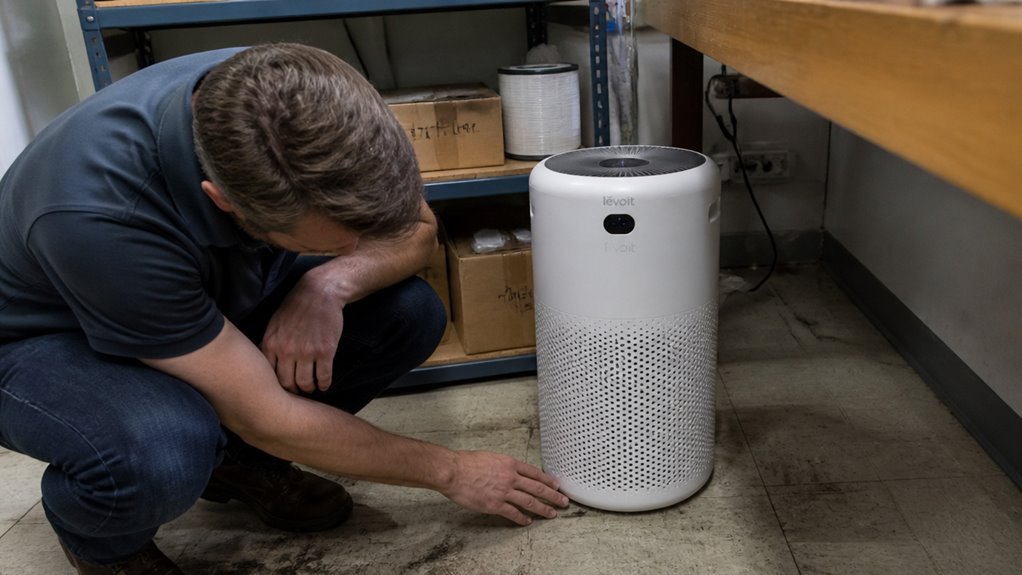
Independent lab testing shows the real CADR is close to the box spec, not a perfect match. A 410 CFM claim clocks in at 398 CFM for PM2.5 and 375 CFM for PM1, which lands at roughly 91% of the advertised figure.
The app CADR tracking displays only the manufacturer’s number, not the lab curve, so avoid chasing a phantom reading there. For a 635 ft² living room, the gap between 410 CFM and 398 CFM is negligible, and you will still clear the air quickly.
Core 600S in Real Rooms: 728 Ft³, 635 Ft², and 2 ACH
The Core 600S cleaned a 728 ft³ test chamber in about 16 minutes at top speed, a solid result for that room volume. That performance translates to roughly 635 ft² at 5 air changes per hour, or 1,588 ft² at 2 air changes per hour, meaning larger spaces simply require more time rather than exceeding the unit’s capacity. In a smaller room, such as a 400 ft² bedroom, the air changes per hour climb higher and cleaning finishes faster, which suits typical daily use. The relationship between room volume, airflow, and air changes per hour is what determines real world coverage, so placement and filter condition matter as much as the stated CADR.
Real-Room Test Results
Real room tests show that performance depends on where you place the unit. In a 728 ft³ space, the purifier removed all PM1 particles in 16 minutes at maximum airflow, but placing it behind a couch reduced airflow while centering it improved results noticeably.
Smoke in a 635 ft² room took 22 minutes to clear instead of 16, and auto mode detected cooking fumes within 10 seconds, ramping up fan speed before the odor became noticeable. Corner placement cut effective clean air delivery by roughly 18 percent.
High cubic feet per minute ratings translate into real purification, but only when the unit has clear space around it. A center placement matters more than the clean air delivery rate spec sheet suggests, so treat the unit as part of the room layout rather than a hidden appliance.
Air Change Coverage Math
Air change math determines how quickly a purifier can clean a room, and the unit’s 398 CFM must match your room’s cubic footage. For a 728 ft³ space, that airflow yields roughly 33 air changes per hour, which is more than most homes need; the practical target is about 635 ft² at 5 air changes per hour for typical living areas.
At 2 air changes per hour, the same airflow covers 1,588 ft², but that level suits maintenance rather than rapid cleaning after a pollution event. To calculate air changes per hour, divide your room volume by the CFM, then multiply by 60; larger rooms stretch the unit thin, so choose based on your actual square footage, not marketing claims.
Small Room Performance
The Core 600S performs very differently depending on the room you place it in. In a tight 728 cubic foot test chamber, it achieved two air changes per hour at maximum speed and cleared fine particles down to PM1 in 16 minutes.
In a larger 635 square foot living area, the same unit drops to roughly 0.7 air changes per hour, which stretches the time needed to clean the air. Its compact 12.3 inch square base allows a nightstand fit in bedrooms, while the corner placement works well against walls.
The top speed produces a 62 dBA noise level that breaks the calm of a small room. On the low setting, the purifier runs quietly and efficiently, making it a sensible choice for tiny spaces.
Use Auto Mode to avoid the loud settings and let the unit adjust airflow on its own. For small rooms, the high fan speed is unnecessary overkill, but the low and auto settings deliver practical performance.
AirSight Plus Auto Mode: Detecting PM2.5 and Showing It
An air purifier that cannot report what it is doing is only a fan, so the Core 600S uses its AirSight Plus laser sensor to make operational decisions automatically. The sensor delivers real time readings of PM2.5 in micrograms per cubic meter, updating every five seconds after startup and mapping thresholds below 115 µg/m³ to a low fan speed and above that to maximum airflow.
The automation shifts from Sleep mode to High mode without manual input, while the display shows the particle count directly for easy checking. This auto mode removes guesswork from daily use, so most rooms will rely on the machine’s readings rather than a manual dial.
What the Indicator Ring Colors Tell You
The indicator ring uses color to show air quality at a glance, and blue is the color most people will see in a typical room. The ring works with the fan speed, so the color and the airflow change together as the sensor reads the air.
Blue means clean air, from 0 to 35 micrograms per cubic meter, and the fan stays on low or sleep speed. Green, from 36 to 75, is acceptable but nudges the fan up. Orange, from 76 to 115, is poor and triggers medium high fan speed. Red, above 115, is unhealthy and sends the fan to maximum.
This color system is a blunt but effective way to communicate health thresholds without needing an app. For most rooms, blue is the baseline, which means the air is fine and the purifier is doing its job quietly.
Core 600S Noise at Every Speed: Sleep to Turbo
Noise performance is inconsistent across the speed range. Sleep mode reaches a quiet 37.9 dBA from three feet, suitable for a bedroom, but speed 1 introduces a distinct whirring hum that is hard to ignore.
Turbo mode produces 62.3 dBA, which is louder than most competing air purifiers at their highest settings. This means the machine is best reserved for daytime use in occupied spaces when at higher speeds.
Sleep Mode Noise Level
Sleep mode on the Core 600S is not silent, measuring 37.9 dBA at three feet, which sits above a whisper and remains audible in a quiet bedroom. The fan produces a smooth low frequency tone rather than a mid range whir, making it tolerable for light sleepers even though it will not mask snoring.
- 37.9 dBA measured at 3 ft, slightly louder than a library’s 30 dBA baseline
- 4.33W power draw, which keeps overnight operating costs low
- HEPA filtration is active only in this mode, meeting HEPA specs at the sleep setting
This noise level is gentle enough for most bedrooms, but it does not approach library grade silence. Think of the sound as a soft, steady breath in the dark rather than a hum that disrupts rest.
Mid-Speed Whirring Sound
Mid speed operation produces a distinct whirring hum, and independent readings place Speed 1 at 44.4 dB and Speed 2 at 45.9 dB. This noise stems from blade turbulence that grows as airflow accelerates, while the motor bearing adds a faint metallic rasp during speed shifts.
You gain 156 cfm of cleaning power at these settings, but sensitive sleepers will notice the difference from sleep mode’s purr. Most users will not hear the whirr past 6 feet, so the trade off works fine for daytime use.
This whirring is efficient, not whisper quiet. If you want silence, stick to sleep mode; otherwise, the faster air turnover justifies the extra noise.
Turbo Speed Loudness
Running the Core 600S at its highest fan speed produces a loud, audible presence, with the turbo setting measuring 62.3 dBA at three feet, comparable to a loud conversation or a vacuum cleaner in the next room. This turbo noise level is the highest among large purifiers we have benchmarked, while sleep mode sits at a whisper quiet 37.9 dBA and speed 2 reaches 45.9 dBA, which remains suitable for an office environment.
The gap between sleep and turbo exceeds 24 decibels, so you trade peace for power, but turbo is rarely needed outside of quickly clearing smoke. Keep the fan below speed 3 for daily living and reserve turbo for short bursts, since the unit delivers strong airflow but at a noticeable noise cost.
Core 600S Power Draw: 4.3W Standby to 48.1W Max
The Core 600S draws between 4.3W in Sleep mode and 48.1W at maximum airflow, with the higher figure expected for moving over 400 CFM. Low speeds stay under 11W, making continuous operation economical, while standby power consumption of 1.3W adds negligible cost.
This power curve makes the purifier a strong choice for round the clock use in large rooms. You pay for meaningful air movement rather than wasted energy, which keeps electricity bills predictable without sacrificing performance.
Filter Facts: 160g Carbon and the HEPA Claim
The Core 600S’s filter holds 160 grams of activated carbon, a modest amount for a purifier this size, and that number alone tells you it’s not built for heavy odor warfare. This carbon amount suits light cooking smells, not chain smoking houseguests or pet accidents. The filter type is a 3 in 1 cylindrical unit, combining pre mesh, particle media, and that carbon core.
Standard 160g carbon handles everyday volatile organic compounds, but it is weak on ammonia or smoke. Specialty filters, such as Pet, Smoke, or Toxin variants, triple the carbon to 360g, which justifies the extra cost if odors matter. The HEPA claim was discontinued after pressure from BBB, so the particle filter only earns HEPA grade in Sleep Mode.
That baseline filter works fine for allergens like pollen and pet dander. For stronger odor control, upgrading to a specialty filter adds real muscle for smoke and chemical fumes.
Frequently Asked Questions
Can the Filter Be Washed and Reused?
The filter cannot be washed and reused. Washing damages the particle and carbon layers, which compromises air purification effectiveness. Filter longevity follows the 6 to 12 month replacement schedule. Eco disposal is required for spent filters, so replace them on time rather than attempting to clean them.
Does Auto Mode Work in Complete Darkness?
Yes, auto mode works in complete darkness. The sensor uses infrared light detection, which does not rely on visible light to measure airborne particles.
This light independent operation keeps monitoring continuous and adjusts fan speed automatically, day or night. You can place the purifier in a dark bedroom or closet without losing automatic air quality response. The sensor functions the same whether the room is bright or pitch black.
How Often Should I Replace the Pre-Filter?
The pre filter should be cleaned every two to four weeks, and replacement ties to the main filter schedule at six to twelve months. Your pre filter lifespan depends on usage and air quality, so a heavily used purifier in a dusty home will clog faster.
Routine checks every month keep airflow strong and protect the main filter. Check the pre filter visually when you change or clean it, and replace it when it no longer rinses clean. Peak performance depends on this simple habit, not on waiting for a set date.
Does Standby Power Consumption Affect Electricity Bills?
Standby wattage does affect your electricity bill, but the impact is so small you will not notice it. A typical 1.3W vampire draw uses about 0.03 kWh daily, which costs pennies per month.
That tiny amount is imperceptible against normal household energy use, so there is no practical reason to worry. Focus your energy saving efforts on larger appliances, such as heating, cooling, and the air purifier’s fan motor, where real savings exist. Unplugging devices with standby lights only matters if you want absolute minimal waste, not for your budget.
Can the Unit Run Continuously for 24 Hours Safely?
Yes, continuous 24 hour operation is safe. The unit’s thermal protection and motor endurance are built for steady use, even if lab testing only covers repeated cycles. Long term reliability is sound, but running at top speeds around the clock can shorten filter life.
Keep the fan speed moderate when you do not need maximum cleaning, and follow the manufacturer’s guidance on filter checks. For a typical bedroom or living room, this approach balances air quality with component wear. If you notice unusual heat or noise, stop the unit and consult the manual.
Rounding Up
Use the auto mode to let the sensor respond to sudden pollution spikes during cooking or other brief events. This works best in a single room up to the size the unit’s airflow can cover, so check the rated area before relying on it.
If you need steady odor control from pets or smoke, keep the carbon filter fresh by replacing it as the manufacturer instructs. The same guidance applies to the main filter, since a clogged one will cut performance.
For any health concerns tied to poor air, ask a doctor instead of assuming filtration will fix symptoms. Let the unit run continuously during high pollution days, and place it with clear airflow around the intake.